



Sentinel-2 into a GPU tensor
- Python · GPU
- Open in Colab
- Notebook on GitHub
Sentinel-2 ships its bands as JPEG2000. The files are small, but decoding them is slow and it all happens on the CPU. In training you pay that cost on every read of every epoch, while the GPU waits for data.
Rumi stores the same pixels, also lossless, in small chunks that the GPU can decode by itself. The CPU only reads the file and sends the compressed bytes.
This notebook reads one whole scene into a GPU tensor with a single CPU thread, from JPEG2000, GeoTIFF and Rumi, and compares the time and the file size. Select a GPU runtime before you start. JPEG2000 takes a few minutes to finish.
Installcode
%pip install -q "rumi-eo==0.28.1" "geozl==0.21.1" rasterioThe scene
Tile 32TPT over the Alps, 28 September 2023, with almost no clouds. We use the red, green and blue bands at 10 m, 10980x10980 pixels in uint16, about 723 MB uncompressed.
import os
import time
import urllib.request

os.environ["GDAL_NUM_THREADS"] = os.environ["OPJ_NUM_THREADS"] = "1"

import geozl
import matplotlib.pyplot as plt
import numpy as np
import pandas as pd
import rasterio
import rumi
import torch

rumi.set_num_threads(1)

URL = "https://sentinel-s2-l2a.s3.amazonaws.com/tiles/32/T/PT/2023/9/28/0/R10m/{}.jp2"
names = ["B04", "B03", "B02"]
jp2 = [f"{band}.jp2" for band in names]

bands = []
for band, path in zip(names, jp2):
    urllib.request.urlretrieve(URL.format(band), path)
    with rasterio.open(path) as src:
        bands.append(src.read(1))
        crs, transform = src.crs, src.transform
rgb = np.stack(bands)

preview = np.moveaxis(rgb[:, ::8, ::8], 0, -1).astype(np.float32)
low, high = np.percentile(preview, (2, 98), axis=(0, 1))
plt.figure(figsize=(8, 8))
plt.imshow(np.clip((preview - low) / (high - low), 0, 1))
plt.axis("off");
Write the files
The GeoTIFF is the usual choice for tiled rasters: 512x512 chunks per band, ZSTD and a horizontal predictor. It decodes on the CPU.
Rumi also cuts each band into 512x512 chunks, and GeoZL compresses each chunk. We write the scene twice, with two codecs that decode on the GPU:
- PFOR packs the values into blocks of bits.
- PivCo adds entropy coding, so the file is smaller. Its recipe,
planar>zigzag>lanes, codes each byte lane with PivCo.
with rasterio.open(
    "rgb.tif", "w", driver="GTiff", height=rgb.shape[1], width=rgb.shape[2], count=3, dtype="uint16",
    crs=crs, transform=transform, tiled=True, blockxsize=512, blockysize=512, interleave="band",
    compress="zstd", predictor=2, zstd_level=9,
) as dst:
    dst.write(rgb)

headers = {}
for name, recipe in (("pfor", "planar>zigzag>pfor"), ("pivco", "planar>zigzag>lanes")):
    frames = rumi.frames(rgb, "b (row h) (col w) -> row col b (h w)", tile_size=512)
    graphs = {}
    for frame in frames:
        if frame.shape not in graphs:
            graphs[frame.shape] = geozl.graph(frame.data, recipe)
        frame.compressed = geozl.compress(frame.data, graph=graphs[frame.shape])
    _, headers[name] = rumi.write(f"{name}.rumi", frames, bands=names, time=["2023-09-28T10:27:44Z"], crs=crs, transform=transform)
os.sync()
Compare
Each read ends when the tensor is ready on the GPU.
- Cold drops the file from the page cache first, so it has to come from disk, like a first epoch.
- Warm finds the file already in memory, like later epochs.
def read_jp2():
    for band, path in enumerate(jp2):
        with rasterio.open(path) as src:
            src.read(1, out=rgb[band])
    return torch.from_numpy(rgb).cuda()


def read_tif():
    with rasterio.open("rgb.tif") as src:
        src.read(out=rgb)
    return torch.from_numpy(rgb).cuda()


def read_rumi(name):
    return rumi.read(f"{name}.rumi", headers[name], framework="torch", device="cuda:0")


def timed(read, paths, cold):
    if cold:
        for path in paths:
            fd = os.open(path, os.O_RDONLY)
            os.posix_fadvise(fd, 0, 0, os.POSIX_FADV_DONTNEED)
            os.close(fd)
    start = time.perf_counter()
    out = read()
    torch.cuda.synchronize()
    return round((time.perf_counter() - start) * 1000)


formats = {
    "JPEG2000": (read_jp2, jp2),
    "GeoTIFF": (read_tif, ["rgb.tif"]),
    "PFOR": (lambda: read_rumi("pfor"), ["pfor.rumi"]),
    "PivCo": (lambda: read_rumi("pivco"), ["pivco.rumi"]),
}
read_rumi("pfor")
torch.cuda.synchronize()

rows = []
for name, (read, paths) in formats.items():
    cold = timed(read, paths, cold=True)
    warm = timed(read, paths, cold=False)
    rows.append((name, sum(map(os.path.getsize, paths)) >> 20, cold, warm))

results = pd.DataFrame(rows, columns=["format", "MiB", "cold ms", "warm ms"]).set_index("format")
results
Summary
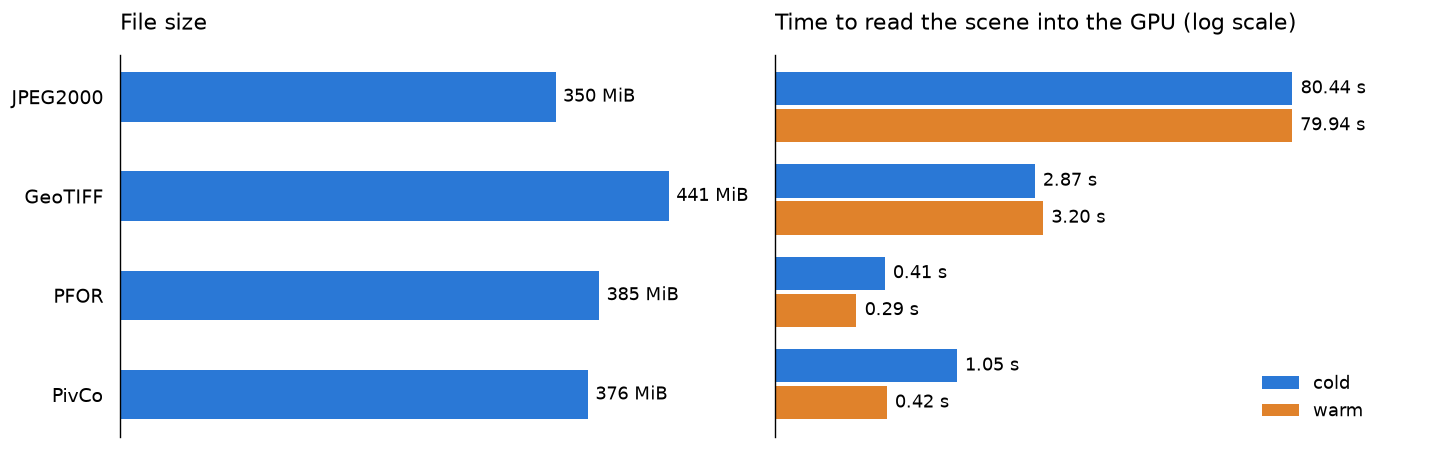
On Colab with one CPU thread, JPEG2000 takes about 80 s per scene and GeoTIFF about 3 s. Rumi reads the scene in about 1 s or less because the GPU does the decoding. PFOR takes 0.29 s warm and PivCo 0.42 s.
JPEG2000 is still the smallest file, but PivCo is only 7% bigger. Choose PFOR for speed and PivCo for size.
Back to the examples